Showing posts with label TroubleShooting. Show all posts

Saturday, November 6, 2010

How to Delete our own communities in orkut.?

Every one facing this problem.Here is the Solution for that.

Follow these steps..


click on "Communities"
click on "owned"
click on your respected community
4.click on "Edit community"
and then
in the left side theres a red cross known delete community
click on it and your community is deleted


Comment Below if you like this article...

Thursday, October 28, 2010

Install Windows Media Player 11 without Validate your Operating System


Go to Google type ‘Download Media Player 11′ and download it.

Download Winrar

- during the install make sure you tick the ‘Intergrate Winrar into shell’ box.

Extract the Windows Media Player 11 Installation file ‘wmp11-windowsxp-x86-enu.exe’ to a folder of your choice. You can do this easily by right clicking on the file and click ‘Extract To …’

Go to the folder you just extracted everything to
Run ‘wmfdist11.exe’ Do Not Restart if it asks.
Run ‘wmp11.exe’ and restart the computer.

Now goto
C:\Program Files\Windows Media Player
Look for the file named ‘LegitLibM.dll’
Right click and re-name it to ‘LegitLib.dll’.

Open Windows Media Player 11 and click the ‘Validate’ button.
Click the ‘Finish’ button.
Click the ‘Accept’ button
Chose the install type etc etc

Thankyou so much everyone. I spent hours googling ways to do this. This is the only method that worked for me.


I found this article with the name user is Expand IT Profile from the site http://www.tech-recipes.com

Monday, October 25, 2010

Firefox is not running in my Computer How can i..?


I have a Solution to run the firefox as normally .

Accessing the Profile Manager.

1.Click start button and click run or(press win+r).
2.type "cmd" in the window for command prompt.
3.Type in the command line argumnets like

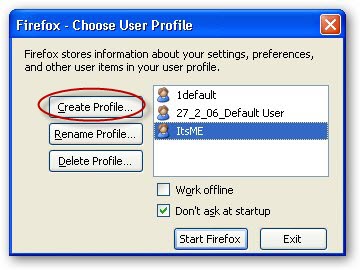
c:\Program Files\Mozilla Firefox/firefox.exe -profilemanager


4.Then you will get a window like below.

5.Then click Start Firefox button.

Your fire fox will start successfully.

If Still it is not working clickhere

Sunday, September 12, 2010

My Networks icon is no longer displyed on taskbar


If you restart the system the Network icon is some times won’t display.

To enable the display of the Network icon follow these steps.

1. Click Start , and then click Control Panel..
2. Click Network and Internet Connections.
3. Click Network Connections icon.
4. Right Click on Local Area Connections.
5. Select properties In General tab Selct the checkbox below first Show icon in notification area when connected. And then click ok.

Your icon will be in taskbar.

MyVolume icon is no longer displyed on taskbar


By default, the Volume icon is not displayed when you initially install Windows XP on your system.

To enable the display of the Volume icon, follow these steps:
1. Click Start, and then click Control Panel.
2. Double-click Sounds and Audio Devices.
3. Click Show volume control on the taskbar.
4. Click OK.

When you have the new desktop features of Windows XP enabled, follow these steps:

1. Click Start, and then click Control Panel.
2. Click Sounds, click Speech, and then click Audio Devices.
3. Click Sounds, and then click Audio Devices.
4. Click Show volume control on the taskbar.
5. Click OK.